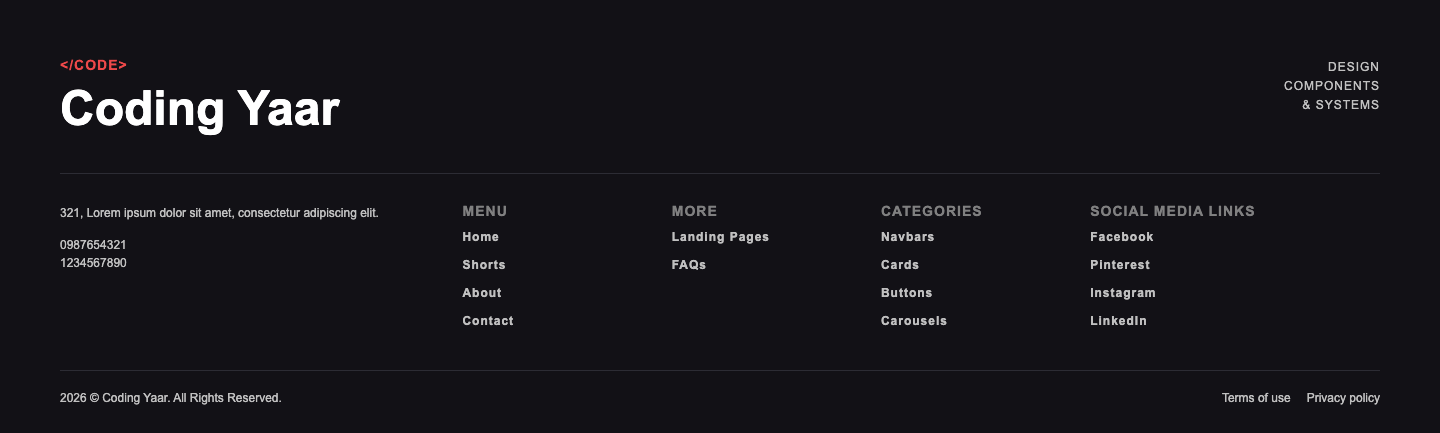
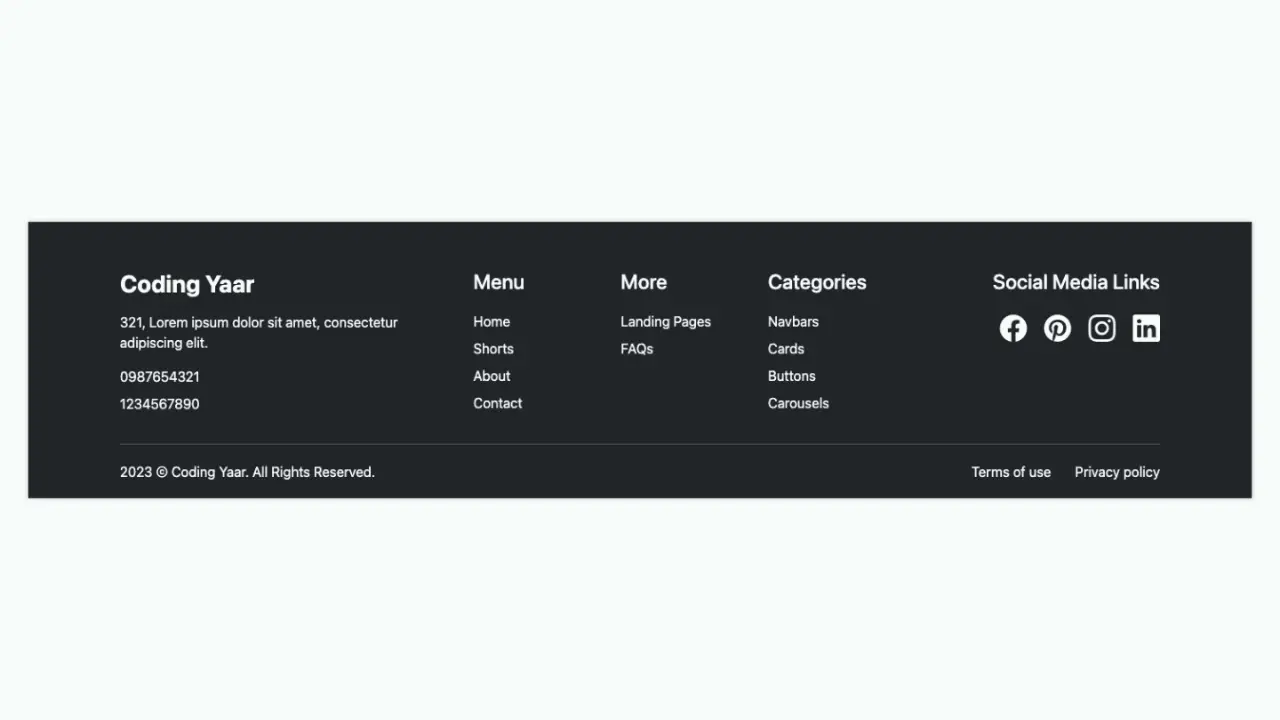
Simple, responsive footer built with HTML and CSS, featuring clear navigation links, categories, and social icons for a clean and user-friendly layout.
Final output:
1. Start with a footer element. Inside it, add a .top div with five .col divs for the brand info, menu links, more links, categories, and social media icons.
First, link the Bootstrap Icons library in the head for the social media icons.
<head>
    <link rel="stylesheet" href="https://cdn.jsdelivr.net/npm/bootstrap-icons@1.13.1/font/bootstrap-icons.min.css">
</head>
Then add the footer structure.
<footer>
    <div class="top">
        <div class="col"><!-- brand info --></div>
        <div class="col"><!-- menu links --></div>
        <div class="col"><!-- more links --></div>
        <div class="col"><!-- categories --></div>
        <div class="col"><!-- social media --></div>
    </div>
    <hr>
    <div class="bottom"></div>
</footer>
2. Fill in the first .col with the brand name, address, and contact numbers.
<div class="col">
    <h3>Coding Yaar</h3>
    <p>321, Lorem ipsum dolor sit amet, consectetur adipiscing elit.</p>
    <p>0987654321</p>
    <p>1234567890</p>
</div>
Reset margins, set the font family, and add the base footer styles. Use display: grid with grid-template-columns: 4fr 2fr 2fr 2fr 3fr on .top to give the brand column more space than the link columns.
* {
    margin: 0;
    box-sizing: border-box;
}
body {
    font-family: Arial, Helvetica, sans-serif;
}
a {
    color: #ffffff;
    text-decoration: none;
}
a:hover {
    opacity: .8;
}
footer {
    background-color: #2f3b52;
    color: #ffffff;
    padding: 2rem;
}
footer h3 {
    font-weight: 700;
    font-size: 1.5rem;
}
footer h3,
footer h4 {
    margin-bottom: 1.5rem;
}
footer .top {
    display: grid;
    grid-template-columns: 4fr 2fr 2fr 2fr 3fr;
    gap: 1rem;
}
footer .col {
    padding: 1rem;
}
footer .col p,
footer .col li {
    margin-top: 1rem;
}
On medium screens, collapse to three columns so the last two link groups wrap to a new row. On small screens, switch to flexbox with flex-wrap: wrap so each column takes as much space as it needs.
@media (max-width: 768px) {
    footer .top {
        grid-template-columns: 4fr 2fr 2fr;
    }
}
@media (max-width: 576px) {
    footer .top {
        display: flex;
        flex-wrap: wrap;
    }
}
Output:
3. Let’s fill in the next three .<strong>col</strong> divs with the navigation links. Use a ul for each group.
<div class="col">
    <h4>Menu</h4>
    <ul>
        <li><a>Home</a></li>
        <li><a>Shorts</a></li>
        <li><a>About</a></li>
        <li><a>Contact</a></li>
    </ul>
</div>
<div class="col">
    <h4>More</h4>
    <ul>
        <li><a>Landing Pages</a></li>
        <li><a>FAQs</a></li>
    </ul>
</div>
<div class="col">
    <h4>Categories</h4>
    <ul>
        <li><a>Navbars</a></li>
        <li><a>Cards</a></li>
        <li><a>Buttons</a></li>
        <li><a>Carousels</a></li>
    </ul>
</div>
Remove the default list styles by setting list-style: none and padding-left: 0 on the ul.
footer .col ul {
    list-style: none;
    padding-left: 0;
}
Output:
4. Add the social media icons in the last .col using Bootstrap Icons.
<div class="col">
    <h4>Social Media Links</h4>
    <div class="social-media">
        <a href="#"><i class="bi bi-facebook"></i></a>
        <a href="#"><i class="bi bi-pinterest"></i></a>
        <a href="#"><i class="bi bi-instagram"></i></a>
        <a href="#"><i class="bi bi-linkedin"></i></a>
    </div>
</div>
Use flexbox with flex-wrap: wrap on .social-media so the icons wrap on smaller screens. Set a larger font size on the icon links to make them more visible.
footer .social-media {
    display: flex;
    flex-wrap: wrap;
    gap: .5rem 1rem;
}
footer .social-media a {
    font-size: 2rem;
}
Output:
5. Add the copyright text and policy links inside .bottom.
<div class="bottom">
    <p>2026 © Coding Yaar. All Rights Reserved.</p>
    <p>
        <a href="#">Terms of use</a>
        <a href="#"> Privacy policy</a>
    </p>
</div>
Use flexbox with justify-content: space-between to push the copyright text and links to opposite ends.
footer .bottom {
    padding: 1rem 1rem 0 1rem;
    display: flex;
    justify-content: space-between;
}
Output:
Final Output Code for Responsive Footer HTML CSS:
HTML
<footer>
    <div class="top">
        <div class="col">
            <h3>Coding Yaar</h3>
            <p>321, Lorem ipsum dolor sit amet, consectetur adipiscing elit.</p>
            <p>0987654321</p>
            <p>1234567890</p>
        </div>
        <div class="col">
            <h4>Menu</h4>
            <ul>
                <li><a href="#">Home</a></li>
                <li><a href="#">Shorts</a></li>
                <li><a href="#">About</a></li>
                <li><a href="#">Contact</a></li>
            </ul>
        </div>
        <div class="col">
            <h4>More</h4>
            <ul>
                <li><a href="#">Landing Pages</a></li>
                <li><a href="#">FAQs</a></li>
            </ul>
        </div>
        <div class="col">
            <h4>Categories</h4>
            <ul>
                <li><a href="#">Navbars</a></li>
                <li><a href="#">Cards</a></li>
                <li><a href="#">Buttons</a></li>
                <li><a href="#">Carousels</a></li>
            </ul>
        </div>
        <div class="col">
            <h4>Social Media Links</h4>
            <div class="social-media">
                <a href="#"><i class="bi bi-facebook"></i></a>
                <a href="#"><i class="bi bi-pinterest"></i></a>
                <a href="#"><i class="bi bi-instagram"></i></a>
                <a href="#"><i class="bi bi-linkedin"></i></a>
            </div>
        </div>
    </div>
    <hr>
    <div class="bottom">
        <p>2026 © Coding Yaar. All Rights Reserved.</p>
        <p>
            <a href="#">Terms of use</a>
            <a href="#"> Privacy policy</a>
        </p>
    </div>
</footer>
CSS:
* {
    margin: 0;
    box-sizing: border-box;
}
body {
    font-family: Arial, Helvetica, sans-serif;
}
a {
    color: #ffffff;
    text-decoration: none;
}
a:hover {
    opacity: .8;
}
footer {
    background-color: #2f3b52;
    color: #ffffff;
    padding: 1rem;
}
footer h3 {
    font-weight: 700;
    font-size: 1.5rem;
}
footer h3,
footer h4 {
    margin-bottom: 1.5rem;
}
footer .top {
    display: grid;
    grid-template-columns: 4fr 2fr 2fr 2fr 3fr;
    gap: 1rem;
}
footer .col {
    padding: 1rem;
}
footer .col ul {
    list-style: none;
    padding-left: 0;
}
footer .col p,
footer .col li {
    margin-top: 1rem;
}
footer .social-media {
    display: flex;
    flex-wrap: wrap;
    gap: .5rem 1rem;
}
footer .social-media a {
    font-size: 2rem;
}
footer .bottom {
    padding: 1rem 1rem 0 1rem;
    display: flex;
    justify-content: space-between;
    flex-wrap: wrap;
    gap: 1rem;
}
@media (max-width: 768px) {
    footer .top {
        grid-template-columns: 4fr 2fr 2fr;
    }
}
@media (max-width: 576px) {
    footer .top {
        display: flex;
        flex-wrap: wrap;
    }
}
If you have any doubts or stuck somewhere, you can reach out through Coding Yaar's Discord server.